
Fee ledger
No more invisible money.
Payments, grace windows, receipts, and parent notices live on the same line. The next move is obvious before the day gets loud.
The operating layer for coaching centers
Fees, attendance, homework, and parent signals move through one calm desk, so the room stays focused on students instead of chasing records.
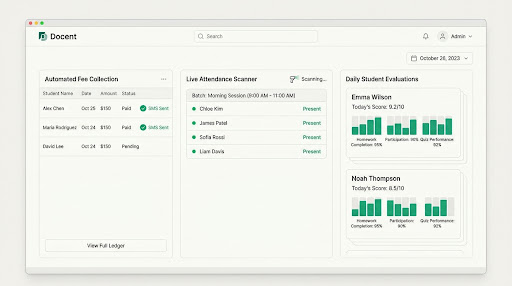
The desk, made quieter
Docent brings the small, high-friction jobs into one operating rhythm: a record that stays current, a signal that arrives on time, and a human layer when the room needs one.
Fee ledger
Phone tap, fingerprint, or QR. One student record across every batch.
Setup, device help, and data entry when software meets the real desk.
Homework and attendance become useful context instead of another message to remember.
Agoodoperatingsystemdoesnotaskteacherstobecomeadministrators.Ittakesthescatteredsignals,keepsthemcurrent,andreturnsoneclearnextaction.
The operating rhythm
Follow the signal from a payment to a parent, from a scan to a student, from a score to a useful conversation.
Log a payment, apply a grace window, and let the parent receipt go out while the record stays current.
A universal student ID keeps the signal intact when a student changes batch, room, or device.
Homework and attendance turn into the context parents need, without another round of chasing.
Hover, focus, or tap each panel. The detail opens without moving you to another page.
Field notes
The best operating layer leaves more attention for the people in the room. These are the principles behind the desk.
The useful thing is not another screen. It is knowing what needs attention before the first class starts.
A desk you can use immediately
Switch the view. Trigger an action. The point is not another dashboard. The point is a day with fewer things hiding from you.
A payment changes the ledger and queues the family receipt in the same action.
৳2,500 due
Grace window closes Friday
A simple place to start
For a teacher with one clear roster.
৳1,200/ month
For a team running multiple batches.
৳2,800/ month
For an operation spread across rooms.
৳6,000/ month
Useful answers
The practical details matter. Here is what happens when the system meets your existing day.
No. Send your paper records or existing spreadsheet and our operations team digitizes the starting point with you.
Yes. The universal student record keeps the attendance signal attached to the person, not just the roster.
Teachers use admin.docentbase.com. Students and families use student.docentbase.com.